User authentication
Flow
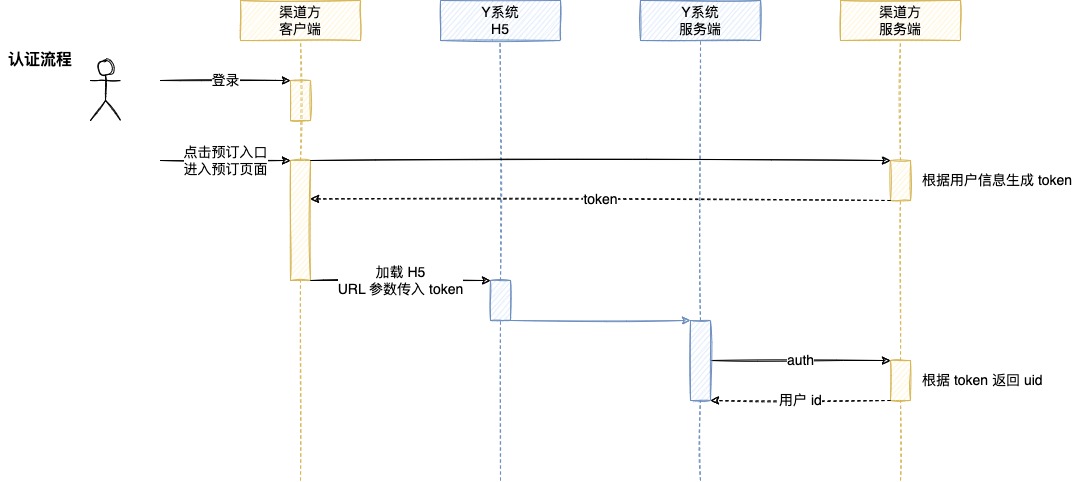
Example implementation
Channel client: H5 integration
When loading a YSystem H5 page, generate a token and pass it as a URL parameter.
const channel = 'mychannel'
const token = 't7W4BB9bswuw7eXrJiXVacQU'
const url = `https://m-app.charmdeer.com/tphotel/index?channel=${channel}&token=${token}`
webview.load(url)
Channel client: mini program integration
When opening the YSystem mini program, generate a token and pass it in extraData.
const token = 't7W4BB9bswuw7eXrJiXVacQU'
const extraData = { token }
wx.navigateToMiniProgram({ extraData })
YSystem server
The YSystem server calls the channel server's auth endpoint to retrieve the user ID.
const token = qs.token
const url = `https://mychannel.com/auth?token=${token}`
const response = await http.request(url)
const uid = response.uid
Channel server
The channel server resolves the token and returns the corresponding user ID.
const token = req.query.token
const userId = getUserId(token)
res.json({ uid: userId })
auth endpoint
This is the recommended baseline contract. The exact parameters can be adjusted during integration.
Request
- Method:
GET - Parameters: query string
| Field | Key | Example | Description |
|---|---|---|---|
| User token | token |
t7W4BB9bswuw7eXrJiXVacQU |
Token generated by the channel |
Response
- Body: JSON
{
  "uid": "user-id"
}
Notes
This flow is recommended because the token can be exchanged for a user ID on the server side. Passing a user ID directly in the URL should only be used after the integration parties explicitly agree on the risk.